The built-in developer tools are mostly
built in JavaScript.
So you'll need to be comfortable with using JavaScript to create applications
(rather than just tweaking pages). Obviously our tools are just for Firefox so
we can take advantage of
ES5 and
ES6
features the second they're added to Firefox so knowing about what's new would help too.
But our team is particularly about helping people understand content
(i.e. HTML and CSS) so you'll also need to understand how pages are laid out
and how to get a browser to bow to your bidding. You'll also need to be good
at creating interfaces that people want to use, and fast at learning because
there's a lot to our platform.
Knowing some C++ could be useful too.
Perfect would be if you've spent time in the trenches of web development
thinking "If only the tools would tell me X, Y and Z, I could be soooo much
better". This is your chance to make millions of people better at their
jobs.
Our team is all around the world, so you can enjoy working from home, and
you'll need to communicate well over IRC, video chat and email. But you'll
also be working on open source software that changes the lives of hundreds of
millions of users worldwide.
If you can help,
apply here,
and contact me directly (twitter or
jwalker at mozilla.com) to make sure you're in
the system, or to ask questions.
So yesterday a whole bunch of people to together to hack on some commands for
the new Developer
Tools Command Line. Thanks to everyone that took part.
This is a quick summary of the commands and hacks that we created. We've now
got to work out what to do with them. Some we'll clean up, localize, test and
ship, and some we'll do some we'll suggest putting onto AMO.
Command
Description
Author(s)
Source
color
Several commands to convert between rgb, hex, hsl and color names
I promised
details of how to take part in the command line hackathon on June 26th ...
Getting Started
The command line is part of the developer toolbar, which is currently
prefed off. You enable it by visiting about:config in Firefox and
setting devtools.toolbar.enabled to true and restarting.
Then use the new Tools → Web Developer → Developer Toolbar menu or
press Ctrl+Shift+V (Win/Linux) or Alt+Cmd+V (Mac) to
open the toolbar
If you want a way to keep your commands around, you'll want to use the
command directory method, if you just want a quick hack, use scratchpad.
Find somewhere to store commands and copy this template
to a file called hello.mozcmd (or you could clone the repo which
could come in handy for submitting your commands). The filename isn't important
but it should end .mozcmd. Then tell Firefox where your directory
is with this command: pref set devtools.commands.dir <PATH-TO-DIR>.
Then refresh the commands from the command dir using cmd refresh
and try out the new command: hello.
To get help and support, the best option is #devtools on irc.mozilla.org
(SSL:on, Port:6697) or see the connection
docs or use IRC on the web at mibbit.com
(Connect to Mozilla, Channel: #devtools).
How to raise a bug
Use this link
to tell us about any problems with the command line.
Submitting a Command
You can submit a command any of the following ways:
Fork this repo and
create a pull request (preferred)
Create a new etherpad containing your submission and put a link to your
new etherpad in the main
etherpad
Email it to jwalker at mozilla.com.
Whichever way you choose, please include the following in your submission so
we know you're happy for us to distribute your work:
Signed-off-by: Your Name <email@example.com>
Adding this text is a statement that you have the right to contribute the
code under the MPLv2 for inclusion in the Mozilla codebase.
I'm in the process of finishing off bug 724055 which will make it as
easy as is possible to create new commands, just set a pref to point to a
directory where your commands are stored in JSON (ish) files, and you're done.
In the next few days I'll update this post (Update: see here)
with a set of resources for creating commands and ideas for commands.
We'll hang out in IRC and crank away and see how many commands we can get
written in a day.
If you can spare some time, we'd love to have some help.
Update: Originally this post had a date typo and said the 27th. The real date
is the 26th.
TL;DR: We're adding a toolbar to Firefox, for developers, which includes a
command line.
It's a great place to add small tools and experimental features, and we're
making it easy to add your own commands.
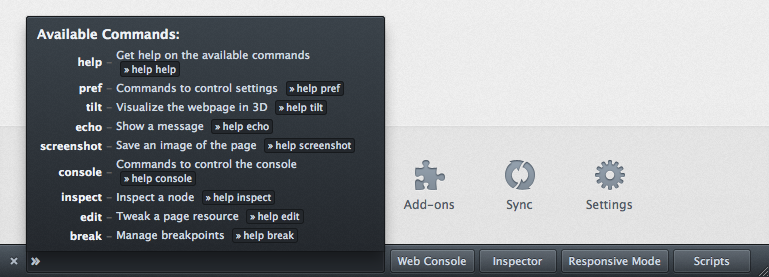
The toolbar should land in Firefox 16 or 17 and will look like this:
The buttons are useful, but I'm most excited about the commands.
We can add an almost unlimited set of commands here without cluttering up the
UI, or making things slow, and we've done lots of work to make the command line
easy to use.
The challenge: It might be stretching things a little to call the command line
a 'platform', and commands 'apps', but the command line still needs commands to
be successful. There's a list of commands that we're working on for
manipulating Firefox developer tools, and we'll be expanding this list to
include system level commands too.
We're planning on a hackathon in a couple of weeks to add to the list of
commands and to check that it really as as easy as we think it is to extend.
Details soon.
If you want to try it out, it's in Nightly now, you'll need to flip the
devtools.toolbar.enable preference in about:config.
Dr. Evil has several options for getting his script to execute in the page of
another site. Generically we call this XSS. Self-XSS involves using
social engineering to coerce a user into manually executing JavaScript using
the location bar or developer tools.
For more, see socially-engineered XSS attacks.
The recent Facebook attack signals that something needs to be done, but
knowing the right response is tricky.
What is Mozilla doing about it?
We're proposing adding a directive to CSP that says 'Please disallow
user supplied JavaScript in the context of this resource'.
It will probably look something like this:
X-Content-Security-Policy: no-user-js
We're also going to add a way for developers to opt out of this protection.
Effectively saying 'I can take care of the JavaScript that I ask my browser to
execute'.
How does this affect other Firefox developer tools?
Warned about Self-XSS, may benefit from protection.
Yes
Unchanged
Minor inconvenience of having to set a preference (one time only) to enable user JavaScript on sites using this Self-XSS protection.
I think this is a fairly clear net win: Minor, one time only, inconvenience to
a sub-set of web developers, vs. full-time protection for the many that
wouldn't recognize a self-xss attack.
Objections: This is a user problem
The goal of educating 7 billion people about what JavaScript can do is lofty,
grandiose, ambitious and utterly unattainable. There has to be another solution.
Objections: This is a Facebook problem
While it's true that allowing untrusted, unvetted, third party, dynamic content
onto your site is something to avoid, I don't think that fixing this either is
going to happen, or would fix the problem. The attack could easily forward you
to another site to see the clipboard injecting flash, before returning you to
the original site for the 'paste' step.
Objections: This is a Flash problem
While it's true that Adobe's clipboard policies are more relaxed than those of
major web browsers, we've seen people caught by instructions that ask people to
select/copy their own attack script. We think that the level of pain caused to
developers by the CSP solution is low enough that we can justify the additional
protection.
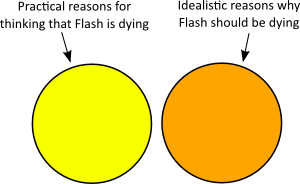
Idealistically the world would wait until something Chromey, Androidy, WebOSy or Maemoy came along out of principle. But we all know that's not going to happen however much we complain.
Recently I've been working on adding collaboration features to Bespin, Mozilla's web code editor. Today they're getting pushed out into bespin.mozilla.com.
Enhanced collaboration is one of the best reasons to do an IDE on the web. It’s possible in a traditional IDE or code editor, but there are lots of features of a web based editor that make it an obvious thing to do on the web.
Our new collaboration feature is still fairly new, and like the rest of Bespin, still fairly beta, but we’ve got it working in Firefox, Safari and Chrome right now.
Type 'follow joewalker' to get someone to share files with. I've shared a project called pubproj globally.
Type 'project list'. You should see joewalker+pubproj in your list of projects.
Type 'set collaborate on' to turn on shared editing.
Open a shared file by typing 'open /joewalker+pubproj/example.txt'.
Or, in one graphic:
You should then be in a collaborative editing session with the rest of the Internet.
Click on the collaboration icon (2 people) in the top right hand corner show you who's editing with you.
How it Works
There are 2 parts to what's new. Firstly there's a way to decide who you want to share stuff with and secondly there's the shared editor. We’re adding 3 or 4 new commands:
follow/unfollow: allow you to decide whose shared projects you want to see in your project navigator. We've gone for a lightweight Twitter style model so it's easy to get started. As we evolve Bespin this will become a way to get all sorts of information about the people you are working with
group: allows you to put the people you are interested in into groups to make it easy to manage sharing
share: allows you to export your projects read-only or editable to individuals, groups, or to everyone
Expressing an interest in someone is as easy as “follow username”. You can then group these users together to make sharing easier. So for me to add Kevin, Ben and Dion to a group, I would do “group add mozlabs Kevin ben dion”. Grouping people like this is totally optional, but it will make maintaining sharing rules a lot easier going forward, when you’re working on a number of projects.
Then if you want to share a project in read-only mode, to someone that is following you, you just type: “share add projectname username”. Replace username with groupname to share with one of your defined groups, or with “everyone” to just throw everything wide open. To allow editing you add “edit” to the end. So for ultimate wiki-like promiscuity: “share add projectname everyone edit”.
Projects shared to you by people you follow will now show up in your file-explorer, or you can edit them from the command line. Type “load /owner+projectname/path/to/file”.
Future Extensions
We’re currently using Mobwrite to provide the diffing and synchronization with some additions to allow us to share collaborator information. We’re hopeful that we will be able to share collaboration systems with a number of other editors in the future. Various developers are working on plug-ins for GEdit, Eclipse, emacs, etc.
Other things that we’re working on include plans for a quick share mode where you can grab a URL post it to an IRC session and instantly be in a shared edit session with the other IRC users.
We've also been discussing in-page chat. We've left it for now because many Bespin users will already have IM or IRC or even Skype or similar, and we want to do something smart with the chat transcripts other than just throwing them away.
Next we’ll be working on getting smooth undo so you have a time machine that can smoothly walk through changes from the current revision back in time through recent saves, and into VCS history, and then into a more lightweight collaboration where when 2 people have 2 check-outs of 1 file, they can both see each others changes to reduce merge pain, without directly affecting each others work.
When I was fresh out of college, my first job was working for the OpenGroup, and my command line looked something like this:
In 2009, fired by the white heat of years of cutting edge research and development, my command line looks a lot more like this:
To be fair, we've now got transparency, anti-aliasing, our shells now do better completion. But that's about it for changes. Considering how much the rest of the industry has changed, that's shockingly glacial.
For the past week or so, I've had the privilege of working on the Bespin command line, and I think there's a lot that we can do to make things better.
This is what my Bespin command line looks like now:
This post is all about how we can make command lines better.
The core of the unix command line philosophy seems to be: small programs and pipe. There’s a lot to be said for loose coupling but there are some drawbacks as well...
Zsh
I love Zsh, and love the fancy completion that it does. Basic file completion has been around since ksh, IIRC:
Zsh knows that you don’t telnet to a file, so it completes against hosts (Does anyone know where that host list came from BTW?)
Zsh also knows about other commands:
$ git [TAB]
add -- add paths to the index
apply -- apply patch on a git index file and a work tree
applymbox -- apply patches from a mailbox
applypatch -- apply one patch extracted from an e-mail
archimport -- import an Arch repository into git
bisect -- find the change that introduced a bug
branch -- create and show branches
checkout -- checkout and switch to a branch
cherry -- find commits not merged upstream
cherry-pick -- cherry-pick the effect of an existing commit
clone -- clones a repository into a new directory
commit -- record changes to the repository
...
That list of commands is the result of a 'git help' command, but that's not what I typed. Zsh has been doing something funky behind my back when I pressed [TAB].
Zsh can do different things depending on where in a command you are:
My point, is that, whilst all of this is very clever, the implementation is also insane.
In order to make this work, the zsh guys have had to reverse engineer every single unix command (or at least all most of the ones that I use). And any time those commands change, then zsh is going to have to change too.
It's very useful, and I'm glad that zsh has done it, and they probably didn't have much of a choice, but this way of going about things is not the Best Idea ever.
I'm sure somewhere the bash guys are working on the same feature themselves, or maybe they've already done it. I don’t care - it just strengthens the point about the lunacy of the situation.
The Unix philosophy of small programs and pipe has a lot to be said for it, but there are serious drawbacks too.
Here's some of the ways that we're innovating when it comes to the Bespin command line, and benefiting from being about to integrate things better.
GUI integration
Traditionally you've had a set of shells (bash, zsh, etc) that work in a set of terminal emulators (xterm, terminal, gnome-terminal, konsole, etc) But there's so much more you could do if you had one program do both.
In Bespin:
If you click on an old command, it gets copied to the prompt (the blue highlight is a mouseover).
If you double click it's re-executed.
Output is not restricted to ascii in a grid. We (predictably) use HTML.
Error output is visually different to normal output
You can minimize or maximize output (the help output has been minimized above) - I hate it when a vcs diff operation takes up 4k lines of scrollback obliterating what I wanted to see.
There's no reason why you couldn't do this in Unix (or even Windows). I don't think you’d want such a gui-shell as your login shell, but since its use is very much from within a GUI, that's OK - you’d probably launch it from the GUI anyway.
In Bespin we don't have pipes yet, but would it be neat to be able to inspect a pipeline visually as it's working, I'm sure it's possible with a gui-shell.
Linking Output to Commands
We link the output from a command to the command that created it. The obvious effect is that output from slow running commands no longer gets confused with what's happening now.
The 'slow' command is just something I hacked up to demonstrate asynchronous behavior.
A nice upshot of this is that we can implicitly add & to the end of every command, and you no longer have to wait for anything.
In essence, each command has it’s own separate stdout, which goes to it’s own div. Maybe there is a reason why unix shells don’t do something similar. Would it mean shells being curses based or something?
Command Meta-Data
With the exception of the reverse-engineering of the command line structure done by zsh, the integration between commands and the shell is limited. In Bespin, a command is a structure like this
{
name: 'createproject',
takes: ['projectname'],
preview: 'create a new project',
usage: '[newprojectname]',
execute: function(commandLine, projectname) {
/* code to do the work */
}
}
This means that we can provide help as the user is typing. The idea is that TAB will guess what you want to do at all times.
This ties in a lot with GUI integration too. If the command line knows that the next parameter is a file, when the user presses TAB without typing anything to complete on, we can offer a dialog to allow selection of a file, and so on. This isn’t about forcing the user to switch to the mouse, but it is about allowing better feedback from the system about what options are available.
We've only really got started with this part - there’s a lot more work to do. I hope we'll be able to do some of the funky GUI integration that Ubiquity has been pioneering.
Attention Guides
There's a lot to look at on any command line, I want to find ways to keep the most important bits in front of your eyes at all times. I'd like to expire older commands more intelligently than a standard terminal (oldest dies first), Commands are more important if:
They are still in progress
They keep being re-executed
They are waiting for input
etc
We've only basically started on this right now, with the ability to hide/show output, but there's potential for it to make the command line lots more usable.
Plug-ins
Linking everything together is easy if you make one big monolithic lump. That's not the plan - we're evolving a plug-in strategy as we go, and planning on making as much of Bespin itself use the plug-in system. The key to coupling is to get the right level of coupling.
Status Messages
My other integration obsession is about status messages. There's a huge amount we could do to integrate the familiar concept of "what are you doing now" with commit messages, bug trackers, chat, and team tracking. More soon.
What other things could we do to trick out the command line?